Setup Socket Barcode Scanner on iOS Devices
The following barcode will configure your scanner into Application Mode for iOS:
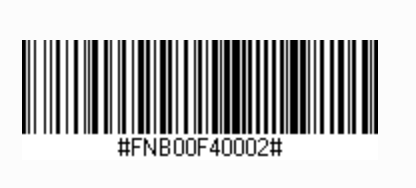
Before you start pairing, make sure that there is no previous pairing saved in the host or in the barcode scanner. If the scanner has been paired with the device before, the pairing can be cleared following these steps:
Turn on the scanner
Press the power button while pressing the scan button
Wait for the scanner to turn off
A series of 3 beeps will confirm the pairing information has been deleted. If these 3 beeps are not heard, retry these steps until you hear the 3 beeps.
To connect the scanner to the host, turn it on and go to the host Bluetooth Settings, select the scanner from the list of the Other Devices to pair to it.
If the scanner has been paired with the device before, first you need to select the scanner from the My Devices list, and choose to Forget the Device, and then proceed to Step 5.